weeDock

Coming soon to the App Store

Your brain is for creating, not storing.

Say a thought, share a screenshot or save a link. weeDock files it under the project you name, or keeps it in your Inbox, so it's waiting for you when you sit down to build.

No account to create Transcribed on your device Syncs through your own iCloud

The problem

Good ideas show up everywhere except your desk.

A screenshot buried in Photos. A voice memo called “New Recording 37”. A link you sent yourself and never opened. By the time you sit down to work, you can't find them, or remember which project they were for.

Taxi App3 new

New Recording 37.m4aPickup spots near the stationVoice · 0:12 · Rider App
IMG_4817.PNGDriver arriving cardScreenshot · Rider App
note to self (2)Waiting fee after five minutesText · Pricing

Sales CRM3 new

Voice memo 0:12What Priya asked for on the callVoice · Contacts
Screenshot 2026-09-14Pipeline with four stagesScreenshot · Pipeline
proposal-final-v3.pdfProposal for phase onePDF · for the client

Clinic Website3 new

Link from MessagesOther clinics' sites worth a lookLink · Home Page
IMG_5120.PNGBooking formScreenshot · Booking
untitled noteDo we ask about insurance?Text · Booking

Capture

Five ways in. A few seconds each.

Save the thought while it's still fresh. Sorting can wait, and the project can be chosen later, or just said out loud.

Voice

Tap, talk, done.

The recorder opens already recording and shows your words as you speak. They become text on your device, in English or Turkish, and the audio stays next to them.
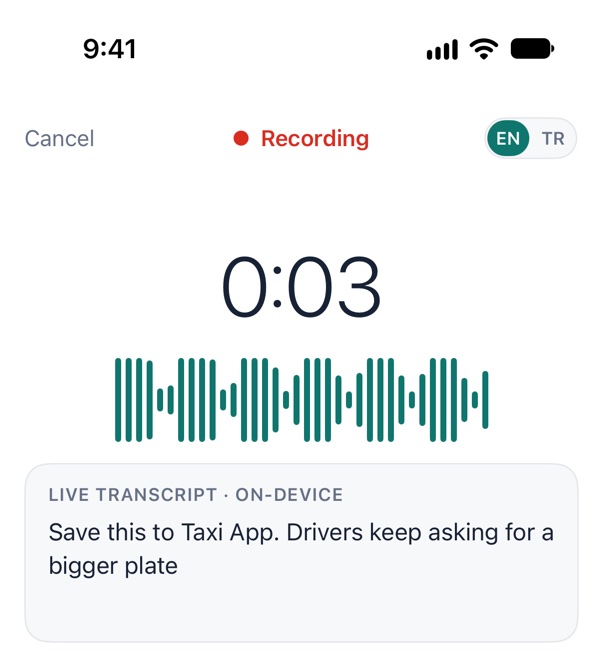

weeDock's recorder at 0:03, with the live transcript: “Save this to Taxi App. Drivers keep asking for a bigger plate”. The recording's red dot and timer in the Dynamic Island. Switch apps or lock the phone: it keeps recording, with the timer in the Dynamic Island and on the Lock Screen.
Action button Control Center Lock Screen “Capture to Taxi App in weeDock”

It never stops on its own. A gentle tap every 30 minutes, the timer in the Dynamic Island, and a safe save if storage or battery run low.

Screenshots & photos

Share it from anywhere.

Share a screenshot, take a photo or pick one. Choose the project and a module, add a tag or a few words, save. Text inside the image is read on your device, so a search finds it months from now.

Text

When talking isn't an option.

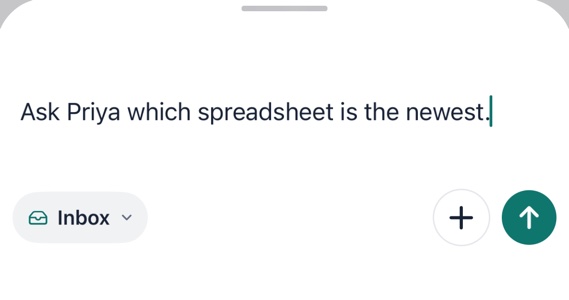
The capture bar's panel with a typed thought, “Ask Priya which spreadsheet is the newest.”, saving to the Inbox.

Tap Type on Home, or the bar on the other tabs, type, swipe it away. It's saved, with Undo for a few seconds.

PDF

Briefs and specs, filed with the idea.

Kept as the file you shared, opened in place.

Always one step away

From any screen.

Share sheet Home Screen widget Lock Screen Siri & Shortcuts

Even with no signal. Captures are saved on the device first and sync when you're back online.

Routing

Say the project. It lands there.

Say “save this to” and the project's name while you talk, and the capture goes straight to it. Teach weeDock how you actually say your project names, and it keeps up.

  1. You picked the projectIts widget, control or Siri shortcut, the bar inside a project, or the project you tap while recording. The Taxi App widget saves to Taxi App.
  2. You said it in the note“Save this to Taxi App” in a voice note, #TaxiApp in a typed one, by its name or a nickname it knows. Only when the match is clear, and Undo is right there. A passing mention moves nothing.
  3. Where new captures goThe “Saves to” choice on Home.
  4. Not sure? It waits in your InboxOn iPhone, tap one of the big folders when you stop recording, or sort it later.
Heard on iPhone · 0:09

“Drivers keep asking for a bigger plate number. Save it for the ride app.”

nickname match →TTaxi AppInbox skipped

Nicknames for Taxi App: taxi · ride app
Add the way speech recognition hears your project once, and it's recognized from then on.

weeDock's banner: Heard ‘Taxi App’. Moved to Taxi App, with Undo.
What the app shows, with Undo for a few seconds.

Inbox

Not sure where it goes? Sort it later.

Anything without a project waits in your Inbox. Go through it one card at a time: tap the project, it moves, the next one comes up. A project the note mentions is marked, and Undo is right there.

Projects

Built for people with more than one project.

Give each project its modules, nicknames and a status. Every project keeps its own Inbox, its ideas and its UI references: the screenshots and designs you saved for it.

T

Taxi App

Ride-hailing app for one city
Active
Rider AppDriver AppPricingSafety
44 captures4 to reviewLast today
S

Sales CRM

CRM for a client's sales team
Active
ContactsPipelineReportsIntegrations
14 captures3 to reviewLast today
C

Clinic Website

New site with online booking
Testing
Home PageBookingSEO
10 captures2 to reviewLast yesterday
Statuses for real life:ActiveTestingPausedCompletedSoldArchived

Review

One idea at a time. Nothing is late.

When you have a few minutes, go through what you saved and decide what each idea is worth. Days are optional, nothing turns red when one passes, no tasks are created for you, and every decision can be changed later.

PlanGoes on the project's Planned list, a candidate for the next build.
LaterKeep it, with no pressure.
ResearchLook into it before deciding.
ArchiveOut of the way, still searchable.

On iPhone, voice notes play back in Review with the transcript following along, at 1×, 1.5× or 2×. Tap a sentence to jump to that moment.

iPhone, iPad and Mac

Capture on the go. Decide at your desk.

The same projects on every device, kept in sync through your own iCloud.

weeDock on the Mac: Taxi App's Board with To review, Planned, Later and Research columns, and the selected idea's details beside it. The Mac's quick capture panel: What's on your mind?, saving to Taxi App.

Mac

Catch a thought from any app with one shortcut, drag ideas across a project's Board, lay its plan out on a Timeline and decide with a single key.

weeDock's Home on iPhone: synced with iCloud, recent projects and the Record a voice note button.

iPhone

Catch thoughts in seconds with the big Record button on Home, the Action button and the share sheet. No project named? Tap one of the big folders when you stop, or leave it in the Inbox.

iPad

The Mac's workspace on the big screen: the sidebar, your ideas and the chosen idea's page side by side, a Board for each project and its plan laid out on a Timeline. Share from other apps, take a photo or scan a document with the camera.

Saved on the device firstSynced through your iCloudReady on every screen

Privacy

Your ideas never touch our servers. We don't have any.

Everything lives on your devices and in your private iCloud. We can't see your notes, because they never reach us.

No account

It uses the iCloud account already on your devices. No email, no password, no sign-up screen.

Transcribed on device

Your iPhone, iPad or Mac turns speech into text. Recordings aren't uploaded anywhere to be processed.

Images read locally

Text in your screenshots is recognized on the device to make them searchable. The original stays untouched.

Yours to take

Export everything as one ZIP, or any project as Markdown with its attachments. Deleted thoughts wait 60 days in Recently Deleted before they're gone.

Questions

Good to know.

Is this an AI app?

No. Version 1 sends nothing to an AI service. Speech and the text in your pictures are recognized on your device, and you decide where every idea goes.

Do I need to create an account?

No. weeDock uses the iCloud account that's already on your iPhone, iPad and Mac.

Which languages can I speak?

English and Turkish, chosen per recording. Both are transcribed on the device with Apple's speech recognition, so nothing is sent out.

Does it work without internet?

Yes. Captures are saved on the device right away and sync when you're back online.

Can a long recording get lost?

A recording never stops on its own. Every 30 minutes you get a gentle tap, the Dynamic Island shows the timer, and if storage or battery run low the file is closed safely with everything up to that moment. If something interrupts, the transcript shows where.

What happens to my data if I stop using it?

It stays yours. Your captures live on your devices and in your iCloud, and you can export everything at any time.

Which devices does it run on?

iPhone with iOS 26 or later, iPad with iPadOS 26 or later, and Mac with macOS 26 or later.

When can I get it?

Coming soon to the App Store.

Who makes it?

Codiwa LLC, a small independent studio. We built it because we kept losing our own ideas between the street and the desk.

Give every idea a home.

Coming soon to the App Store, for iPhone, iPad and Mac.